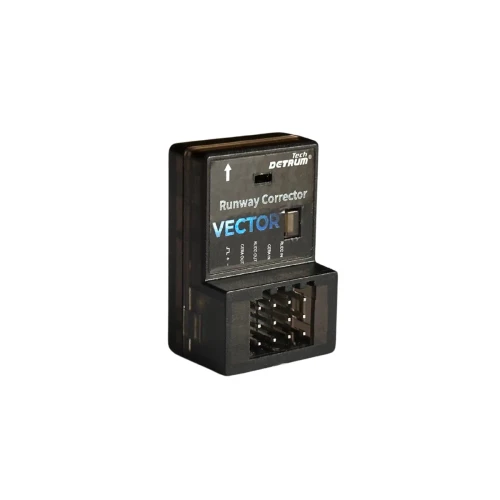
Detrum Vector Runway Corrector Anti-Sideslip Takeoff Front wheel Gyro for RC Plane Plug and play
Detrum
- SKU:
- DY-V001
- Shipping:
- Calculated at Checkout
Description
DETRUM VECTOR Runway Auto-Correction Gyro: Your Runway Guardian.
- Keep RC Plane Straight on Takeoff & Landing
Tired of dangerous runway drift on takeoff or landing? Crosswinds and mechanical play can turn ground handling into a nightmare, often leading to loss of control or crashes.
The DETRUM VECTOR anti-sideslip front steering Gyro is the precise solution. This plug-and-play module automatically corrects steering deviations, ensuring stable, straight-line taxiing on any surface—grass or pavement. Its adaptive algorithm works for any aircraft size with no manual tuning needed.
Key Features:
- Automatic Runway Correction: Instantly counteracts drift from wind and steering play.
- Zero Configuration: Adaptive algorithm. Plug and fly. No gain adjustments.
- Universal Compatibility: Compact design integrates seamlessly with existing RC systems.
- Plug and play without debugging
- Build Confidence: Makes every pilot safer and more successful on the ground.
Land and Launch with Confidence.
1. Wiring and Installation
There are a total of 4 signal ports.
| Signal No. | Corresponding Port | Port Description |
| 1 | RUDD IN | Signal Input: To Receiver RUDD Channel |
| 2 | GEAR IN | Signal Input: To Receiver GEAR Channel |
| 3 | RUDD OUT | Signal Output: To Nose Wheel/Steering Servo |
| 4 | GEAR OUT | Signal Output: To Landing Gear Unit |

1.2 Installation
Installation is supported in 4 directions: face up, face down
face left, face right

2. Calibration
2.1 Purpose & When to Calibrate
Calibration is performed to correctly set the unit's feedback direction and installation orientation. Re-calibration is required whenever the following parameters are changed:
- Trim or sub-trim on the steering (rudder) channel.
- Direction (reverse) setting of the steering (rudder) or gear channel on the transmitter.
- Physical installation direction of the correction unit.
2.2 Calibration Procedure
- Enter Calibration Mode: Press and hold the unit's button until the LED indicator slow flashes. The unit enters Calibration Mode and stops all automatic correction. You may now adjust steering trim or mechanically center the nose wheel.
- Set Reference Position: Ensure the model is on a level surface. Switch the assigned control channel (typically the gear channel) to the ON position. Then, move the steering control stick fully to the left. The LED will begin rapid flashing.
- Complete Calibration: While the LED is rapidly flashing, immediately return the steering stick to the center/neutral position. The LED will return to a solid light, indicating successful calibration.
3. LED Status Guide
| LED Indicator | Status Description |
| Off | No valid receiver signal detected. |
| Solid On | Normal operation; receiver signal is present and stable. |
| Slow Flash | Calibration Mode is active. |
| Rapid Flash | Ready to accept the left-endpoint reference during calibration (Step 2.2). |
Please click here for Detrum Vector Runway Corrector Manual.
Detrum Vector Runway Corrector Gyro Video Comparison:
Watch demo video here: https://youtube.com/shorts/aN65rFlssLs?si=tzYfyERvLkOFDuqD
Learn How to Wire the DETRUM VECTOR Runway Correction Gyro:
Returns Policy
You may return most new, unopened items within 30 days of delivery for a full refund. We'll also pay the return shipping costs if the return is a result of our error (you received an incorrect or defective item, etc.).
You should expect to receive your refund within four weeks of giving your package to the return shipper, however, in many cases you will receive a refund more quickly. This time period includes the transit time for us to receive your return from the shipper (5 to 10 business days), the time it takes us to process your return once we receive it (3 to 5 business days), and the time it takes your bank to process our refund request (5 to 10 business days).
If you need to return an item, simply login to your account, view the order using the "Complete Orders" link under the My Account menu and click the Return Item(s) button. We'll notify you via e-mail of your refund once we've received and processed the returned item.
Shipping
We can ship to virtually any address in the world. Note that there are restrictions on some products, and some products cannot be shipped to international destinations.
When you place an order, we will estimate shipping and delivery dates for you based on the availability of your items and the shipping options you choose. Depending on the shipping provider you choose, shipping date estimates may appear on the shipping quotes page.
Please also note that the shipping rates for many items we sell are weight-based. The weight of any such item can be found on its detail page. To reflect the policies of the shipping companies we use, all weights will be rounded up to the next full pound.
Related Products

FMS
FMS Reflex V3 Gyro Stablizer Flight Controller for RC plane
The system version MUST be updated before installing to the plane. Outdated version or software may cause the plance crashing!

Volantex
Volantex RC EAR403 5CH Receiver with Gyro for RC PLANE 76502; 76801;76702;74701;74706; 75706; 75704
PR2202 with box for 747-6,747-8,757-6

Hobby Station
RC Plane Wheel 45x2.5x12 (1 Piece)
RC Plane Wheel 45x2.5x12 (1 Piece)

Hobby Station
RC Plane Wheel 40x12x2.5 (1 Piece)
RC Plane Wheel 40x12x2.5